
Netezza Support Plus
User Guide
Netezza Support Plus Description
Smart Associates offers 3 tiers of support for customers running legacy Netezza/PureData for Analytics systems and Netezza Performance Server for Cloud Pak for Data (CP4D), including Hammerhead: Essential, Comprehensive and Managed.
Whether or not your system continues to be supported by IBM, the only major differences between our support service and IBM’s are:
Pricing: we offer a combination of fixed (all inclusive) pricing models; 9×5 (work day) or 24×7 hours of cover; non-production, volume, and small system discounts; and charge a flat rate per supported system (no matter how large).
Software: we are able to remotely investigate and diagnose the cause of performance or stability issues and provide assistance resolving these without the need for software updates in the vast majority of cases. Where a software or firmware update is required we can perform this remotely, but require the customer to have downloaded the latest versions of IBM’s NPS software and related tools and utilities prior to their support contracts expiring, as this is software that IBM owns and licenses.
Hardware: customers can choose between purchasing and installing replacement hardware components either:
- Themselves – under our remote guidance and direction, including root cause analysis of reported hardware issues, and identification of the correct IBM FRU (Field Replaceable Unit) part number that will need to be procured, as well as remote assistance with replacement part installation and configuration (including hardware replacement training, if necessary), or
- Via a local 3rd party partner, who will provide a field engineer to perform all on-site hardware replacements for a fixed price per year (including parts, although in this case the fixed price will vary according to the physical size of the system).
Netezza Support Service Tiers
Essential – This is the basic level of support that provides remote assistance for software issues only. Customers procure and install replacement parts themselves without our support.
Comprehensive – This is an enhanced level of support that covers software and hardware. It includes fixed price cost of all replacement parts (that we procure) and on-site field engineering resources. The service includes regularly scheduled health checks and remediation plan recommendations, unlimited access to our technical resources for responding to technical questions and a range of other activities to ensure your Netezza systems run at optimum performance.
Managed – Our Managed Service offering gives customers access to our full range of products and services. In addition to the features of the Comprehensive tier, our technical team acts as your virtual DBA, performing a wide range of monitoring and remediation tasks on your behalf. Customers also have unlimited access to: Smart Database Replication; Smart Access Control; Smart System Management; SuperTuning; SuperGovernance; and SuperCuration. For more information on these features see our Smart Management Frameworks webpage.
All tiers come with:
- Choice of cover periods: Office Hours only (Mon-Fri 9AM-5PM, excluding public holidays), or 24×7 cover
- Small system discount for systems that are less than half rack
- Non-production system discount available for dev/test/DR environments
Netezza Support Service Tier Features
| Essential | Comprehensive | Managed | |
|---|---|---|---|
| Access to our help desk ticketing system via web and email |  |
|
|
| Optional integration with Netezza’s built-in event monitoring and alert notification subsystem | |
|
|
| Remote Software Break/Fix Support | |
|
|
| Remote Hardware Break/Fix Support |  |
|
|
| Customers procure and install replacement parts themselves, without our support | |
|
|
| Includes fixed price cost of all replacement parts and on-site field engineering resources | |
|
|
| Regularly scheduled system health checks and remediation plan recommendations | |
|
|
| Best practice guidelines and advice in response to technical questions | |
|
|
| Software/firmware upgrades or downgrades as necessary | |
|
|
| Risk mitigation advice against identified security vulnerabilities | |
|
|
| Performance Tuning and Workload Management recommendations | |
|
|
| Smart Database Replication: automated database replication for disaster recovery and backup management | |
|
|
| Smart Access Control: automated synchronization of users, groups, and permissions with EntraID/LDAP domains | |
|
|
| Smart System Management: automated execution of regular housekeeping tasks (e.g. catalog vacuuming, nzhostbackup, etc.) | |
|
|
| SuperTuning: automated optimization of database objects needing statistics collection, reorganization, or grooming to improve query performance | |
|
|
| SuperGovernance: automated monitoring of database query activity and notification if any custom data governance rules have been violated | |
|
|
| SuperCuration: automated deletion, aggregation, or obfuscation of data according to customizable, flexible, and granular criteria | |
|
|
| Optional services for an additional fee: database/query/code design, development, or migration; source system, application, or bespoke process support; technology/vendor selection, evaluation, or price negotiation; technical training | |
|
|
Service Levels
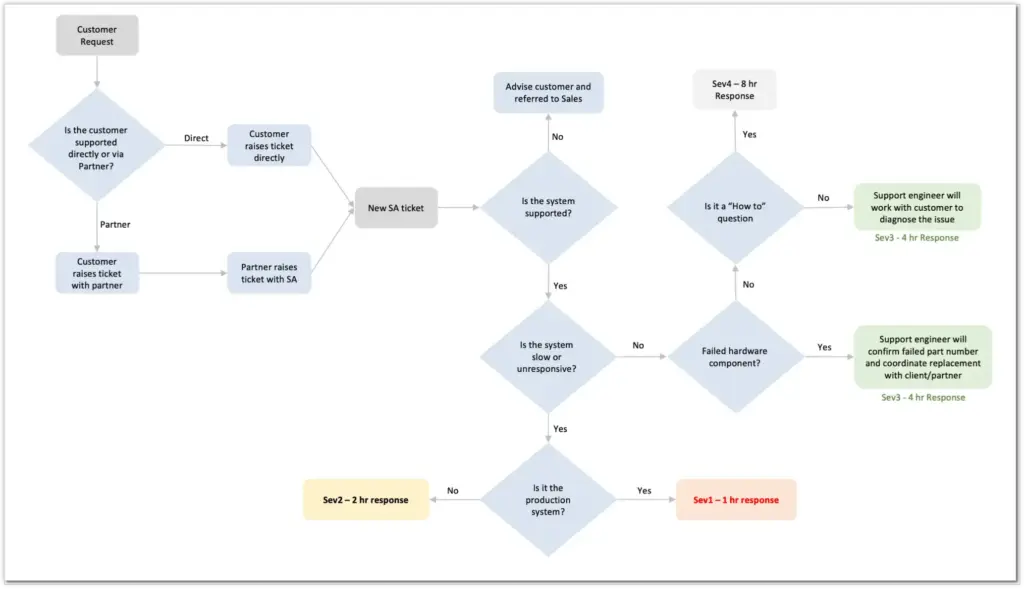
The table below shows our service level categories and targets:
The flowchart below describes the support process:
Service Operation
Before we can begin supporting a customer system, we must first perform the Onboarding Process described in the section below. Once that’s done, we will automatically be alerted to any significant system events occurring on all supported systems. Customers are also always free to raise new support requests manually
either via our dedicated website https://smart-associates.atlassian.net/servicedesk/customer/portal/1 or simply by sending an email to su*****@***rt.associates
All remote access is either via a customer-provided secure VPN connection, or using our WebEx remote desktop sharing software, or a customer’s preferred alternative mechanism (e.g. Microsoft Teams). Details regarding provisioning of access are provided in the Onboarding Process section below.
Onboarding Process
Once a customer has signed up for one of our support tiers, we perform the following steps to onboard the customer and provision the service.
1. Agree Remote Access Methodology
In order to be able to help customers resolve problems we can initiate a remote desktop sharing session using either Cisco WebEx, Microsoft Teams, or alternatively a customer-hosted preference (e.g. Zoom, GotoMeeting, etc.)
The only problem with the remote desktop access method is that it requires someone from the customer side to join a conference call and share their screen for the duration of the incident resolution process. Some customers prefer us to be able to remotely connect to their network directly (e.g. using their preferred Virtual Desktop Interface or Virtual Private Network protocols) and log in to the supported servers in order to work on support tickets without tying up a member of staff and their workstation. We’re happy to do this, but would recommend the following guidelines:
- a generic smart_associates Netezza host and database user be created for us to login to (once the remote network connection has been established, via the customer’s preferred secure method). The purpose of this is to ensure that everything we do is auditable, that we never have access to any sensitive system passwords, and so that it’s easy to revoke access just by changing the password of or deleting these users.
- The smart_associates Netezza host user should be in the sudoers list, and be able to sudo su – nz and sudo su – root (as there are some diagnostic and configuration tasks that can only be performed as those users on the system). The purpose of the su command is to give us the privileges needed, but without needing to know the passwords for these accounts.
- The smart_associates database user should have the same permissions as the Netezza database admin user (in order to be able to perform the same types of diagnostic and configuration tasks, as necessary). Note that if the Netezza host user already provides Netezza database admin user access, then it may not be necessary to create a specific database user account for us.
2. Jira Service Management Registration
Jira Service Management is the SaaS provider we use for creating and managing customer support ticket requests, and should be the primary way customer’s interact with our Help Desk (emailing individuals directly is not encouraged, as they may not necessarily be available, whereas there should always be a support engineer on call monitoring Jira Service Management).
Raising a support ticket can be as simple as sending an email to su*****@***rt.associates or logging in to our dedicated portal: https://smart-associates.atlassian.net/servicedesk/customer/portal/1 but tickets can only be raised by registered, authorised users of the system.
In order to do this, we first need to be provided with a list of names and email addresses for all the customer’s personnel who are authorised to raise support tickets with us (including any generic distribution list email addresses that are used to notify members of the development, operations, and/or management teams of any nzevent alerts). Once we have these details, we will create the equivalent Jira Service Management users and send out introductory emails to registered customer staff members, which will enable them to log into the support portal and change their default password.
3. Health Check
Once we have gained remote access to a customer’s environment, via the preferred methodology agreed above, the first thing we do is perform a Netezza Health Check, by running the nzhealthheck command and inspecting the log file it produces. The purpose of the health check is to determine if there are any immediate software or hardware issues that need resolving as a matter of urgency.
If the system is still under IBM support this provides an opportunity for any necessary replacement parts or software patches to be ordered directly from IBM via a PMR prior to the existing support agreement ending.
Alternatively, if the system is no longer supported by IBM, then we can procure the necessary replacement parts on our customer’s behalf. In order to determine the correct parts to order, another set of commands we commonly run for TwinFin generation hardware (due to variations in disk and host parts) are the following:
As user nz:
ssh mm001 info -T blade[1] | grep -i hs

nzpush -s 1/1 encl show --all | grep -i exp
As user root:
dmidecode -t 1
4. NZ Event Integration
In order for Jira Service Management support tickets to be automatically raised when any significant hardware or software events occur on a supported system, the su*****@***rt.associates email address needs to be added to any configured nz events requiring our attention, and the ‘from’ address changed from the default ev*********@*****za.com to eventsender@{your domain}. This is something we can either do on a customer’s behalf, or they can perform themselves using the guide at Appendix A. Please note that without such integration, support tickets will have to be manually raised by customers themselves, as described in the Jira Service Management Registration section above.
Clearly in order for this to work it is essential that the Netezza systems are able to communicate with mail or proxy servers capable of sending emails outside of the customer organisation. Again this is something we’d be happy to assist with.
5. Communication and Change Management Plan
So that we’re aware of:
- what we can and can’t do without authorisation under the support agreement
- how to get such authorisation if required, and
- who to communicate with when performing operations that may potentially affect on line or batch overnight users and processes,
it is essential that we are provided with the necessary change management, and issue escalation and notification processes documentation to ensure we can remain compliant with our customer’s internal standards and procedures.
If such documentation doesn’t exist, we’d be happy to help produce it in consultation with the necessary and appropriate customer personnel.
6. Hardware Replacement Training
Any failed hardware components requiring replacement under this support agreement will be performed by the customer by default, unless they have specifically opted for the on-site hardware replacement service in which case our local partners will perform such activities on their behalf. We have an optional remote training program to guide customers through the entire hardware replacement process if this is something they are not already comfortable and familiar with. Please raise a ticket to ask for it to be scheduled if required.
Regardless of whether a customer has completed the optional hardware replacement training or not, we highly recommend they raise a support ticket before attempting any kind of hardware replacement so that we can provide assistance throughout the process by remotely running all the necessary commands to locate the failed component (making a led flash on the cabinet to ensure the right part is removed) as well as to format/power cycle/firmware upgrade/etc. any replacement components and rebuild/reconfigure them (if/as necessary).
Frequently Asked Questions
Does your team have previous expertise in managing the different Netezza models that we use currently through experience with other clients?
Yes. We used to support over 600 Netezza customers globally on behalf of Netezza and then IBM for 5 years (during the transition from TwinFin to Striper – N1000 to N2000 series), and some of our team even worked on the Striper and Mako engineering side of things. We also support a number of large Mako and Hammerhead customers’ systems directly around the world at present. So you’re in safe hands.
Do you have any reference-able customer case studies where you have have successfully delivered this service (either geographically or within a specific vertical)?
Yes, we’d be happy to put you in touch with any of the following reference customers on request:
Are you aware of all the correct part numbers that are used for each different type of appliance?
Yes. We know exactly which part numbers to order for which models (one of the reasons why we perform a health check first is in order to determine the correct parts for each system we support). Most importantly we know the IBM FRU numbers to make sure we get the right combination of disk drive, and chassis, to fit the supported system
What is the process of recovering from failed disks (as in, after the disk is replaced, will your DBA experts manage the recovery remotely)?
Yes, we can run all the necessary commands remotely to locate the failed component (making a led flash on the cabinet to ensure the right part is removed) as well as to format/power cycle/upgrade firmware/reset serial number/etc. any replacement components and rebuild/reconfigure it (if necessary). This is also true of host as well as SPU/Sblade parts, SAS switches, AMMs, etc. If you want we can teach you how to do these things yourself, but the reality is most customers prefer us to do all this for them
Have you sourced these types of disks before, and is it through a 3rd party hardware vendor?
Yes, we have a variety of sources for parts. Some are from existing customers who we’ve supported and helped migrate off Netezza; some are from 3rd parties. Which source we use depends on availability, and price – but the point is we have several available in our supply chain.
As part of the monthly coverage, does the Netezza support cover any periodic patches, and maintenance of all layers (firmware, Netezza platform, etc)?
We are absolutely capable of installing patches and upgrades to all layers of software and firmware – obviously in consultation with the customer to ensure change control procedures are met, and that any such maintenance occurs during a correctly scheduled window. The one thing we ask is that you please download all currently available patches and software updates (e.g. NPS, HPF, FDT, INZA, Performance Portal, SQL Extensions, etc.) while you’re still covered by IBM Support so these can be applied if and when necessary at a time of your choosing.
Does this service invalidate IBM support for HW, SW etc ?
Not as such, but given IBM refused to support any N1001/N2001 systems beyond the end of June 2019, and N2002 systems beyond the end of June 2020, and will stop supporting N3001 systems after April 2023, this is surely not a concern. All our replacement parts are certified IBM components.
What happens when Smart Associates can’t fix a problem? Who do they escalate to, if anyone?
This has never happened. As previously mentioned we have numerous ex-Netezza and IBM support engineers on the team who know the systems inside out and know what they’re doing.
Having said that, given the age and unsupported nature of some of these systems, along with the fact that some components are no longer even manufactured, It is entirely possible we may run into an issue we’re not able to resolve and under such a circumstance clearly the support service would have to end. If the issue of using an unsupported platform is important to you, we can optionally migrate everything off your existing Netezza systems onto an alternative supported platform typically within a matter of weeks. Please let us know if you require a separate quote for this.
Yes. We used to support over 600 Netezza customers globally on behalf of Netezza and then IBM for 5 years (during the transition from TwinFin to Striper – N1000 to N2000 series), and some of our team even worked on the Striper and Mako engineering side of things. We also support a number of large Mako and Hammerhead customers’ systems directly around the world at present. So you’re in safe hands.
Yes, we’d be happy to put you in touch with any of the following reference customers on request:
Yes. We know exactly which part numbers to order for which models (one of the reasons why we perform a health check first is in order to determine the correct parts for each system we support). Most importantly we know the IBM FRU numbers to make sure we get the right combination of disk drive, and chassis, to fit the supported system
Yes, we can run all the necessary commands remotely to locate the failed component (making a led flash on the cabinet to ensure the right part is removed) as well as to format/power cycle/upgrade firmware/reset serial number/etc. any replacement components and rebuild/reconfigure it (if necessary). This is also true of host as well as SPU/Sblade parts, SAS switches, AMMs, etc. If you want we can teach you how to do these things yourself, but the reality is most customers prefer us to do all this for them
Yes, we have a variety of sources for parts. Some are from existing customers who we’ve supported and helped migrate off Netezza; some are from 3rd parties. Which source we use depends on availability, and price – but the point is we have several available in our supply chain.
We are absolutely capable of installing patches and upgrades to all layers of software and firmware – obviously in consultation with the customer to ensure change control procedures are met, and that any such maintenance occurs during a correctly scheduled window. The one thing we ask is that you please download all currently available patches and software updates (e.g. NPS, HPF, FDT, INZA, Performance Portal, SQL Extensions, etc.) while you’re still covered by IBM Support so these can be applied if and when necessary at a time of your choosing.
Not as such, but given IBM refused to support any N1001/N2001 systems beyond the end of June 2019, and N2002 systems beyond the end of June 2020, and will stop supporting N3001 systems after April 2023, this is surely not a concern. All our replacement parts are certified IBM components.
This has never happened. As previously mentioned we have numerous ex-Netezza and IBM support engineers on the team who know the systems inside out and know what they’re doing.
Having said that, given the age and unsupported nature of some of these systems, along with the fact that some components are no longer even manufactured, It is entirely possible we may run into an issue we’re not able to resolve and under such a circumstance clearly the support service would have to end. If the issue of using an unsupported platform is important to you, we can optionally migrate everything off your existing Netezza systems onto an alternative supported platform typically within a matter of weeks. Please let us know if you require a separate quote for this.
Appendix A – Configuring NZ Events
Step 1 – Check that each of your Netezza systems can send emails externally:
/nz/kit/sbin/sendMail -dst su*****@***rt.associates -msg "Hello Smart Support" -bodyText "Hello from {your company / system}"
If sendMail does not work, check mail server configuration
/nz/data/config/sendMail.cfg
Also ensure the config file has appropriate values for the following entries to identify customer and system
sender.name     = "Event Manager – { your company / system}"

sender.address  = "{email address}"
Step 2 – Once sendMail has been configured and tested, get all the configured alerts:
nzevent -syntax
Sample output will look like this:
-name ‘AekSecurityEvent’ -on no -eventType aekSecurityEvent -eventArgsExpr ” -notifyType email -dst ‘ti-datacentres@{your domain}’ -ccDst ” -msg ‘NPS system $HOST – AEK Security Event generated at $eventTimestamp $eventSource.’ -bodyText ‘$notifyMsgnnn$errStringn’ -callHome no -eventAggrCount 0
-name ‘Disk80PercentFull’ -on yes -eventType hwDiskFull -eventArgsExpr ‘$threshold == 80 || $threshold == 85’ -notifyType email -dst ‘ti-datacentres@{your domain}’ -ccDst ‘DatabaseAlerts@{your domain},TI-BusinessSystems@{your domain},DatabaseAlertsSMS@{your domain}’ -msg ‘NPS system $HOST – $hwType $hwId partition id $partition is $value % full at $eventTimestamp.’ -bodyText ‘$notifyMsgnnSPA ID: $spaIdnSPA Slot: $spaSlotnLun Id: $lunIdnThreshold: $thresholdnValue: $valuen’ -callHome yes -eventAggrCount 0
-name ‘Disk90PercentFull’ -on yes -eventType hwDiskFull -eventArgsExpr ‘$threshold == 90 || $threshold == 95’ -notifyType email -dst ‘ti-datacentres@{your domain}’ -ccDst ‘DatabaseAlerts@{your domain},TI-BusinessSystems@{your domain},DatabaseAdministrationGroup@{your domain}’ -msg ‘CRITICAL-URGENT: NPS system $HOST – $hwType $hwId $partition partition is $value % full at $eventTimestamp.’ -bodyText ‘$notifyMsgnnSPA ID: $spaIdnSPA Slot: $spaSlotnThreshold: $thresholdnValue: $valuen’ -callHome no -eventAggrCount 50
-name ‘HardwareFailed’ -on yes -eventType hwFailed -eventArgsExpr ” -notifyType email -dst ‘ti-datacentres@{your domain}’ -ccDst ‘DatabaseAlerts@{your domain},TI-BusinessSystems@{your domain}’ -msg ‘NPS system $HOST – $hwType $hwId failed at $eventTimestamp $eventSource.’ -bodyText ‘$notifyMsgnnSPA ID: $spaIdnSPA Slot: $spaSlotn $eventSourcen’ -callHome yes -eventAggrCount 50
-name ‘HardwareNeedsAttention’ -on no -eventType hwNeedsAttention -eventArgsExpr ” -notifyType email -dst ‘ti-datacentres@{your domain}’ -ccDst ” -msg ‘NPS system $HOST – $hwType $hwId Needs attention. $eventSource.’ -bodyText ‘$notifyMsgnnlocation:$locationnerror string:$errStringndevSerial:$devSerialnevent source:$eventSourcen’ -callHome yes -eventAggrCount 0
-name ‘HardwareRestarted’ -on yes -eventType hwRestarted -eventArgsExpr ” -notifyType email -dst ‘ti-datacentres@{your domain}’ -ccDst ‘DatabaseAlerts@{your domain},TI-BusinessSystems@{your domain}’ -msg ‘NPS system $HOST – $hwType $hwId restarted at $eventTimestamp.’ -bodyText ‘$notifyMsgnnSPA ID: $spaIdnSPA Slot: $spaSlotn’ -callHome yes -eventAggrCount 50
-Step 3 – Disable all CallHome alerts being sent to IBM Support
nzcallhome -disable

nzcallhome -remove
To turn the nzcallhome alerts off manually (they have Auto suffixed to the alert name and execute the nzcallhome command instead of sending emails)
nzevent modify -name 'disk_monitorPredictiveAuto' -on no

nzevent modify -name 'hwNeedsAttentionAuto' -on no

nzevent modify -name 'hwPathDownAuto' -on no

nzevent modify -name 'hwServiceRequestedAuto' -on no

nzevent modify -name 'hwVoltageFaultAuto' -on no

nzevent modify -name 'regenFaultAuto' -on no

nzevent modify -name 'scsiDiskErrorAuto' -on no

nzevent modify -name 'scsiPredictiveFailureAuto' -on no

nzevent modify -name 'spuCoreAuto' -on no

nzevent modify -name 'sysStateChangedAuto' -on no

nzevent modify -name 'topologyImbalanceAuto' -on no
Step 4 – Add our support email addresses to the CC address of the other alerts:
Take note of any existing email address already present and append to that
nzevent modify -name 'AekSecurityEvent' -on yes -ccDst 'DatabaseAlerts@{your domain}, su*****@***rt.associates'

nzevent modify -name 'Disk90PercentFull' -on yes -ccDst 'DatabaseAlerts@{your domain}, su*****@***rt.associates'

nzevent modify -name 'HardwareFailed' -on yes -ccDst 'DatabaseAlerts@{your domain}, su*****@***rt.associates'

nzevent modify -name 'HardwareNeedsAttention' -on yes -ccDst 'DatabaseAlerts@{your domain}, su*****@***rt.associates'

nzevent modify -name 'HardwareRestarted' -on yes -ccDst 'DatabaseAlerts@{your domain}, su*****@***rt.associates'

nzevent modify -name 'HardwareServiceRequested' -on yes -ccDst 'DatabaseAlerts@{your domain}, su*****@***rt.associates'

nzevent modify -name 'HeatThresholdExceeded' -on yes -ccDst 'DatabaseAlerts@{your domain}, su*****@***rt.associates'

nzevent modify -name 'HistCaptureEvent' -on yes -ccDst 'DatabaseAlerts@{your domain}, su*****@***rt.associates'

nzevent modify -name 'HistLoadEvent' -on yes -ccDst 'DatabaseAlerts@{your domain}, su*****@***rt.associates'

nzevent modify -name 'Hostdiskthreshold' -on yes -ccDst 'DatabaseAlerts@{your domain}, su*****@***rt.associates'

nzevent modify -name 'HwPathDown' -on yes -ccDst 'DatabaseAlerts@{your domain}, su*****@***rt.associates'

nzevent modify -name 'NPSNoLongerOnline' -on yes -ccDst 'DatabaseAlerts@{your domain}, su*****@***rt.associates'

nzevent modify -name 'RegenFault' -on yes -ccDst 'DatabaseAlerts@{your domain}, su*****@***rt.associates'

nzevent modify -name 'SCSIDiskError' -on yes -ccDst 'DatabaseAlerts@{your domain}, su*****@***rt.associates'

nzevent modify -name 'SCSIPredictiveFailure' -on yes -ccDst 'DatabaseAlerts@{your domain}, su*****@***rt.associates'

nzevent modify -name 'SpuCore' -on yes -ccDst 'DatabaseAlerts@{your domain}, su*****@***rt.associates'

nzevent modify -name 'SystemOffline' -on yes -ccDst 'DatabaseAlerts@{your domain}, su*****@***rt.associates'

nzevent modify -name 'SystemOnline' -on yes -ccDst 'DatabaseAlerts@{your domain}, su*****@***rt.associates'

nzevent modify -name 'SystemStuckInState' -on yes -ccDst 'DatabaseAlerts@{your domain}, su*****@***rt.associates'

nzevent modify -name 'ThermalFault' -on yes -ccDst 'DatabaseAlerts@{your domain}, su*****@***rt.associates'

nzevent modify -name 'TopologyImbalance' -on yes -ccDst 'DatabaseAlerts@{your domain}, su*****@***rt.associates'

nzevent modify -name 'TransactionLimitEvent' -on yes -ccDst 'DatabaseAlerts@{your domain}, su*****@***rt.associates'

nzevent modify -name 'VoltageFault' -on yes -ccDst 'DatabaseAlerts@{your domain}, su*****@***rt.associates'
Since the Disk80PercentFull alert is the initial warning for storage getting full, we route this to our VBDA email address rather than Support
nzevent modify -name 'Disk80PercentFull' -on yes -ccDst 'DatabaseAlerts@{your domain}, vd**@***rt.associates'
The following events are classed as ‘ noisy’ and so are not routed to support:
- RunAwayQuery
- SystemOnline
- NPSNoLongerOnline or SystemOffline
Step 5 – NOC notices:
Finally, nzevent is a self monitoring and alerting mechanism. If the system went completely offline (e.g. host failure and secondary node doesn’t take over, or firewall issues blocking out all connectivity) then customer needs to rely to external monitoring via their NOC. e.g. send us alerts if your NOC notices the system has been offline for more than a predefined period of time.
Any Questions?
For further information why not contact us.